In a sunlit living room, a hand rests on the touchpad of the Framework Wireless Touchpad Keyboard on a round wooden side table.

Finally, a couch keyboard that you want to use

Framework Wireless Touchpad Keyboard is a compact, sturdy keyboard for your media PC, Raspberry Pi, or any computer across the room. Connect up to four wireless devices over Bluetooth® wireless technology or the USB-A Dongle, or plug in with USB-C to type wired and recharge. Replaceable parts keep it running for years, and open-source ZMK firmware lets you make it your own.

Framework Wireless Touchpad Keyboard
US English ANSI

Est. total
$99.00

How do pre-orders work?

A pre-order reserves your spot in a production batch. When you place your pre-order, we charge a deposit. The remaining balance, including applicable taxes and shipping, is charged shortly before your order ships. You can cancel for a full refund of your deposit any time before the remaining balance is charged.

How much is the deposit?

The deposit amount is shown on the product page and at checkout before you place your pre-order.

FAQs

    1. Pre-order confirmed. We charge your deposit and email you your order number and shipping window. You can view your order anytime in your Framework account, and you can cancel for a full refund until your remaining balance is charged.
    2. “We’re preparing your order” email. This email means your remaining balance will be charged within 5 days. Check your shipping address and payment method by the date in the email.
    3. Payment complete. We email you once the remaining balance is charged. Your order can no longer be canceled. It goes to our warehouse and ships within 5 business days.
    4. Your order has shipped. We email you a tracking number. Most orders arrive within 5 business days of shipping.
    If your shipping window changes, we’ll email you and update the order summary in your Framework account.

    Unfortunately, pre-orders and in-stock items can’t be purchased in the same order. To buy in-stock items, place a separate order and they’ll ship on their own.
  • Your pre-order ships within the window shown for your batch when you ordered. You can see it anytime in your Framework account under Orders. When we have a more specific date, we’ll email you and update it there.
  • Some products ship in larger batches, so each batch covers a wider shipping window, such as Q1 2027 (January, February, or March). We’ll narrow it down to a specific date as production progresses and we have better visibility on shipment dates.
  • Your deposit is charged when you place your pre-order. The remaining balance, including applicable taxes and shipping, is charged to your saved payment method within 5 days of receiving the “We’re preparing your order” email. The exact amount is listed in that email.
  • Yes, until your remaining balance is charged. Cancel from your Framework account under Orders, and your deposit is refunded to your original payment method. Once the remaining balance is charged, your order is being prepared for shipment and can’t be canceled. You can still return it after delivery under our standard return policy.
  • Yes. Update them in your Framework account by the deadline in your “We’re preparing your order” email. If you change your shipping address, taxes and shipping may change your remaining balance. Please check the updated total before you confirm.
  • Make sure your saved payment method is valid and has enough available credit before the deadline in your “We’re preparing your order” email. If we can’t charge it, we’ll email you and try again over the next 2 weeks. If the payment still doesn’t go through after 3 attempts, your order will be canceled and we’ll email you to let you know.
  • Unfortunately, pre-orders and in-stock items can’t be purchased in the same order. To buy in-stock items, place a separate order and they’ll ship on their own.
  • If your shipping window changes, we’ll email you with the new timing and update your Framework account. You can cancel for a full refund of your deposit any time before your remaining balance is charged.
  • No. Pre-orders are scheduled to ship in Q1 2027, so they won’t arrive before the December holidays. If you’re ordering it as a gift, plan for it to arrive in the new year.
local_shipping
Batch 1 Ships Q1 - Sold Out Batch 2 Ships Q1 - Sold Out Batch 3 Ships Q1 Batch 4 Ships Q1
monetization_on Cancel your pre-order any time before shipment for a full refund 30-day return guarantee verified_user Limited warranty

Downloads and guides

Getting started with your Framework Wireless Touchpad Keyboard

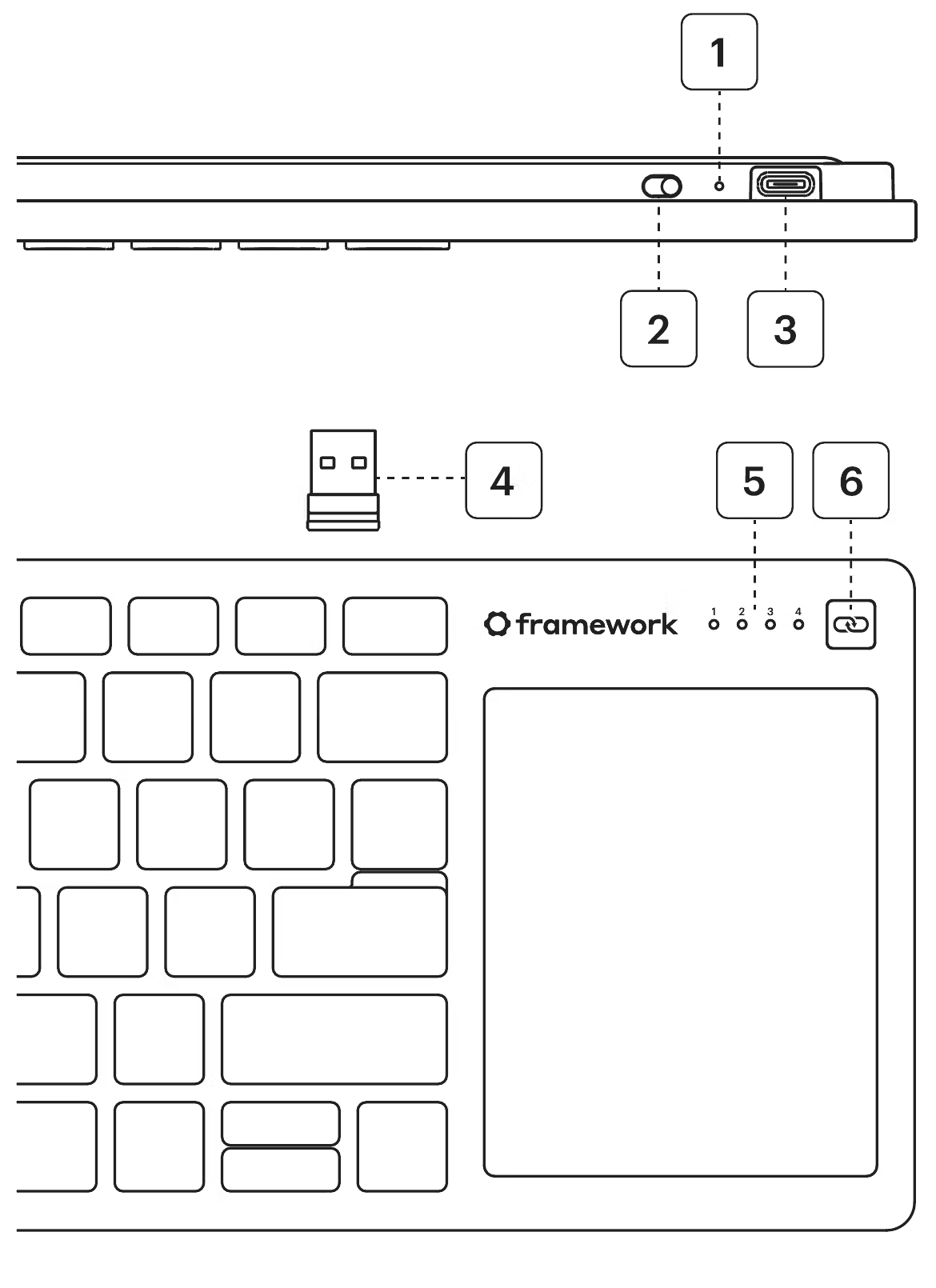
Know your keyboard

It comes paired to its Dongle and ready to use out of the box. A USB-C cable isn't included.

  1. Charging Indicator: Amber while charging, white when full, blinks red when the battery is low.
  2. Wireless On/Off Switch: On for the Dongle or Bluetooth. Off for wired with a USB-C Cable plugged in.
  3. USB-C Port: Charge, or connect with a cable (not included).
  4. Channel Indicators: Show which channel you’re on. Channel 1 is the Dongle; Channels 2–4 are Bluetooth.
  5. Channel Switch Button: Short-press to change channels. Hold for 3+ seconds to enter pairing mode on Channels 2-4.
Switching between devices

Pair the Dongle plus up to three Bluetooth devices. Short-press the Channel Switch Button to move between them, or press Fn + 1, 2, 3, or 4.

Touchpad close-up
  • Pairing or connection trouble? Coming soon

Using it with a Mac

Fn + O for 3 seconds to enter Mac mode
(Back to PC mode: Fn + P for 3 seconds)
Framework key: ⌥
Alt key: ⌘
Tapping Fn key: 🌐
Most macOS touchpad gestures work

Key shortcuts

Fn Lock on or off: Fn + Esc
Home / End: Fn + Left / Right
Page Up / Page Down: Fn + Up / Down
Restart the keyboard: hold Fn + J + Z for 4 seconds
Unlock ZMK Studio: Fn + `

  • All keyboard shortcuts Coming soon

Update firmware

Use the Framework web updater to get the latest ZMK firmware for new features and fixes. Works in Chrome and Edge.

Switching on Keyboard
  • Use Framework web updater Coming soon

Customize

Remap your keyboard

Built on open-source ZMK, so you can change any key with ZMK Studio. No coding or reflashing needed. Works in Chrome or Edge.

Go to ZMK Studio, Remap your keyboard

Typing on keyboard

Default keymap

A printable reference of every key and layer as it ships, so you know where you're starting from.

  • Download default keymap Coming soon

Developer resources

Software development

Open-source ZMK firmware and config to inspect, remap, and extend. Want to go further than ZMK Studio? Edit the config files directly.

Go to GitHub repository, Software development

Software terminal with text

Hardware development

Open-source CAD to design accessories, mounts, or a custom keyboard from the ground up.

Go to GitHub repository, Hardware development

Hardware

Control Board

The brain of the keyboard, sold on its own with breakout pinouts ready for DIY builds.

Control board

Developer community forum

Share projects and ideas, from custom keymaps to entirely new builds around the Control Board.

Go to Community, Developer community forum

Developer community

Add-ons, upgrades, and repair parts

Framework Marketplace

Join the waitlist for other Framework Wireless Touchpad Keyboard accessories and repair parts.

Go to Marketplace, Framework Marketplace

Ecosystem

USB-A Adapter Expansion Card

Using it with a Framework Laptop? Keep the Dongle flush inside your laptop instead of sticking out of a port. It works with many other brands' USB-A Dongles too.
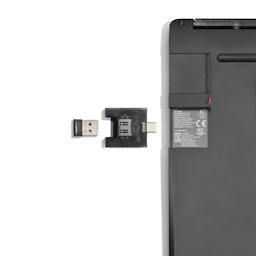
USB-A Adapter Expansion Card

Step-by-step guides

Find a guide to replace any user-replaceable part.

Lifestyle - screwdriver
  • Swap your battery Coming soon
  • Replace your Control Board Coming soon

Stay connected

Our Blog

Read the launch story and the latest product updates.

Go to blog, Our Blog

Our blog

See what others are saying

Read some of our reviews and customer testimonials.

Reviews

Learn more about Framework

Meet the team and learn about our mission to remake consumer electronics.

Learn more, Learn more about Framework

Framework Team

Sustainability

Learn about our commitment to reducing environmental impact and our initiatives to redefine the industry.

Learn more, Sustainability

Sustainability

Need help?

Knowledge Base

Answers to common questions, including pairing and connectivity troubleshooting.

Go to Knowledge Base

Still have questions?

We're here to help!

Community

Online forum for questions, projects, support help, and more.

Go to Community

Framework for Business

Volume ordering and support for businesses or schools.

Connect with the Business team, Framework for Business

Looking for regulatory information? Download the Framework Wireless Touchpad Keyboard safety & compliance manual (PDF)